Offline-First 100% Private on Your Machine

Your Documents. One Workspace.

FileDeck organizes paperwork with sub-millisecond Tantivy search, on-device Qwen 2.5 AI, schema-driven data entry, and 30 native PDF utilities. No cloud accounts. Zero outbound telemetry.

Zero Cloud Uploads
Local Qwen 2.5 LLM
30 Native PDF Tools
MIT Open Source
FileDeck Workspace
● 100% Offline (Localhost:8080)
Native Core Stack — Engineered for Local Execution
Rust Axum 0.7 Native Core
Qwen 2.5 1.5B Local CPU AI
Tantivy BM25 Full-Text Search
SQLite WAL Zero Network Sync
Tauri v2 Desktop App
RapidOCR ONNX Engine
Local Isolated Process Pipeline
0 Outbound Sockets
Tauri Desktop Shell & React UI
Frontend
Native webview rendering, hotkeys, and local file picker
Rust Axum 0.7 Backend Core
:8080 Core
Tantivy BM25 indexing, SQLite WAL database, document state
Python Worker & Local Inference
:8000 Worker
Qwen 2.5 (1.5B), RapidOCR (ONNX), PyMuPDF 30 tools
Local Storage & Deduplication
Filesystem
On-disk SHA-256 deduplicated files, 30-day safety trash net
Local-First Architecture

Full Document Control.
Without Cloud Risk.

Online document tools upload sensitive contracts, invoices, and bank statements to remote servers. FileDeck executes OCR, full-text indexing, and AI synthesis strictly on your local CPU.

  • 100% Offline Privacy
    Files never leave your machine. No telemetry, third-party analytics, or cloud storage syncing.
  • Intelligent Document Processing (IDP)
    Extract structured tabular data from invoices and tax records with custom schemas, bounding-box review, and Excel (.xlsx) export.
  • Sub-Millisecond Tantivy BM25 Search
    Rust-powered Tantivy search index locates text across millions of OCR tokens, titles, senders, and tags in milliseconds.
Interface Tour

Explore FileDeck's
6 Core Offline Workspaces

Every screen engineered for speed, privacy, and local execution. Click on any snapshot to view the high-resolution interface.

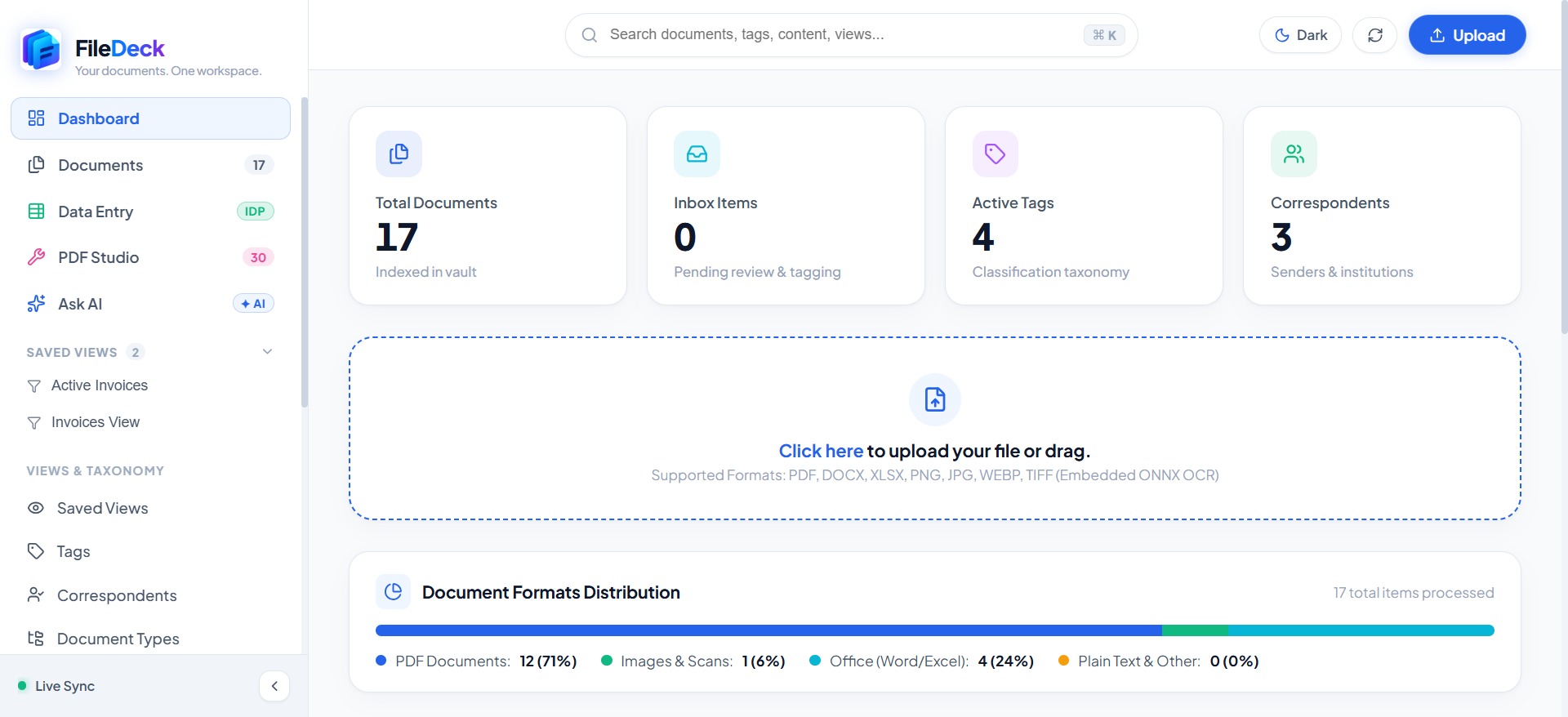
Dashboard & Ingestion Metrics
01 • Storage & Health

Storage health overview, disk usage breakdown, tag distribution cloud, and rapid-access cards for recently processed files.

Disk Storage Breakdown Tag Cloud Ingestion Throughput
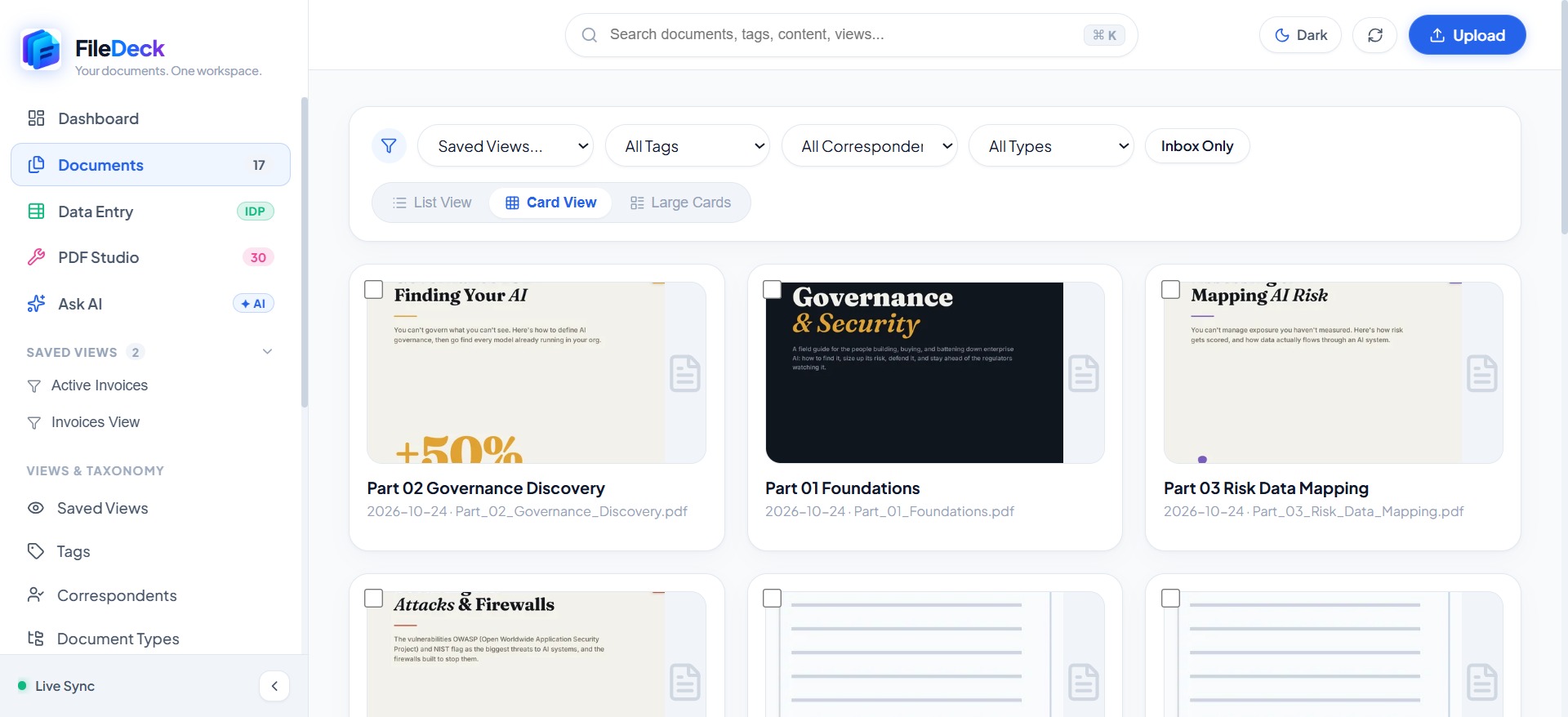
Document Explorer & Faceted Search
02 • Ingestion & Drawer

Multi-format ingestion (PDF, DOCX, XLSX, images). Table, card, and preview modes with instant faceted filters, saved views, and metadata drawer.

Faceted Search SHA-256 Deduplication Saved Views
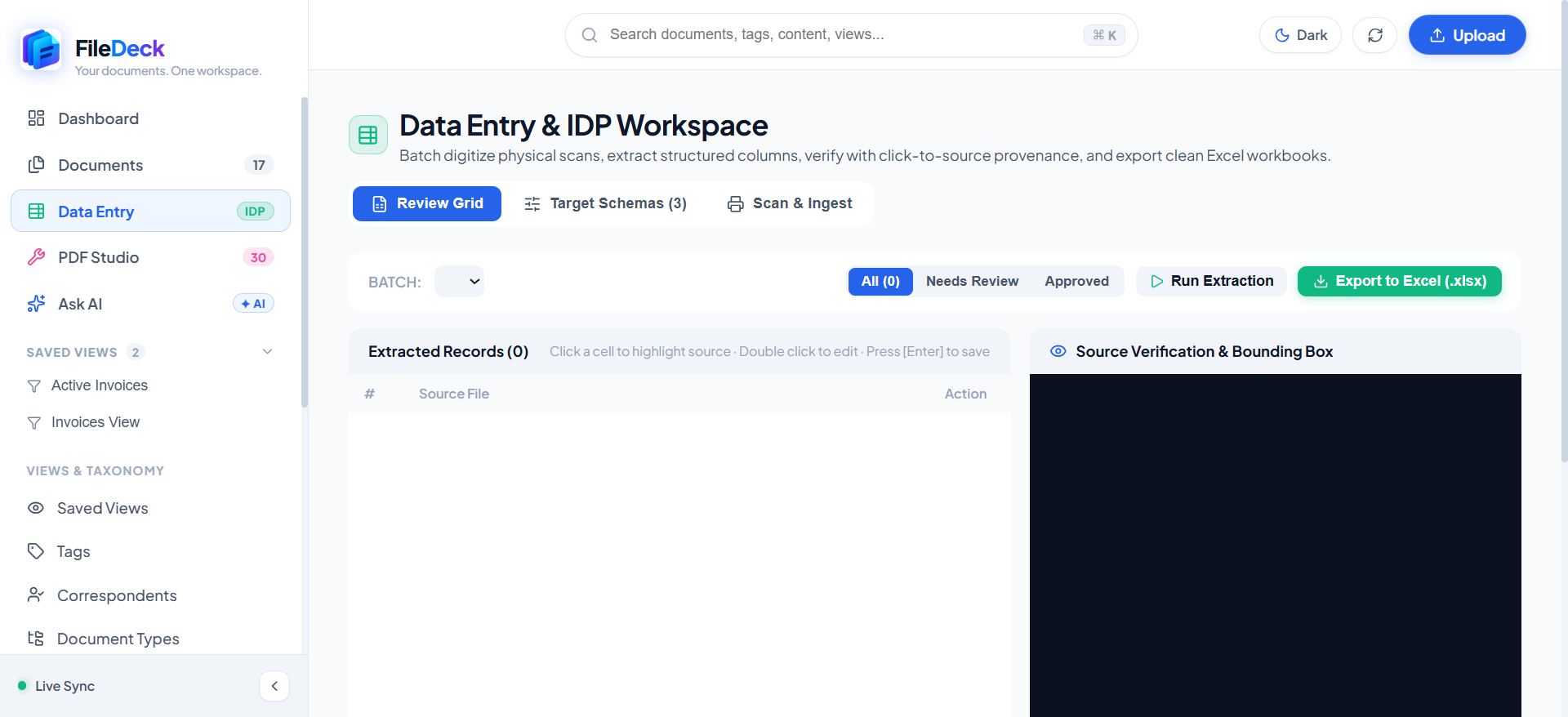
Data Entry & IDP Workspace
03 • Schema Extraction

Human-in-the-loop review interface for bills and invoices. Click cells to inspect bounding box overlays, run validation schemas, and export to Excel (.xlsx).

Bounding Box Audit WIA / NAPS2 Scanner ADF Excel & CSV Export
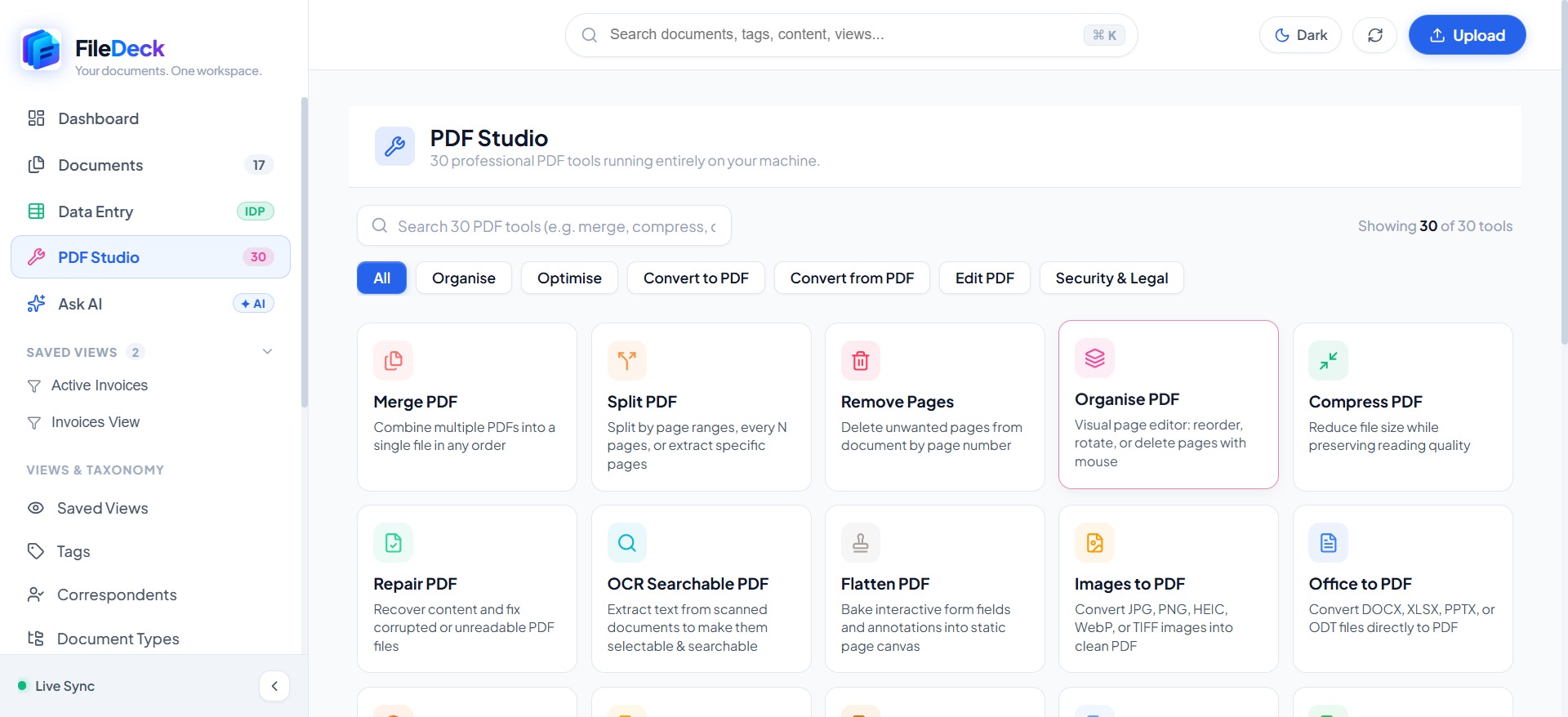
30-in-1 Native PDF Studio
04 • Offline Workstation

Native offline tools: merge, split, compress, repair, OCR, Office to PDF conversion, blackout redact, signature stamps, and side-by-side diff comparison.

Merge & Split AES Encryption Blackout Redact PDF/A Archive
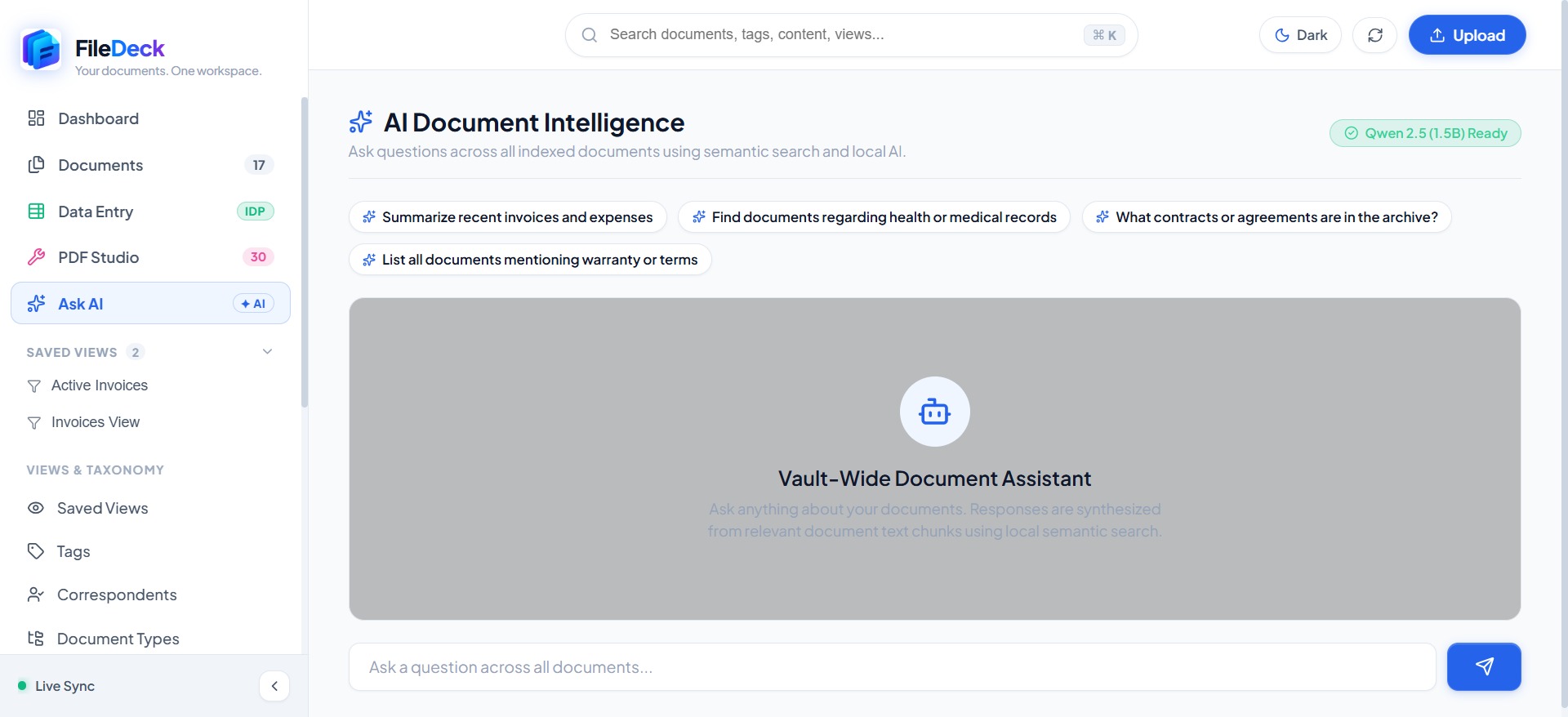
Ask AI — Local Assistant
05 • On-Device LLM

On-device Qwen 2.5 (1.5B Instruct) running on standard CPUs. Query across your local documents, extract clauses, and retrieve pinpoint citations without internet access.

100% On-Device CPU Document Citations BGE Vector Search
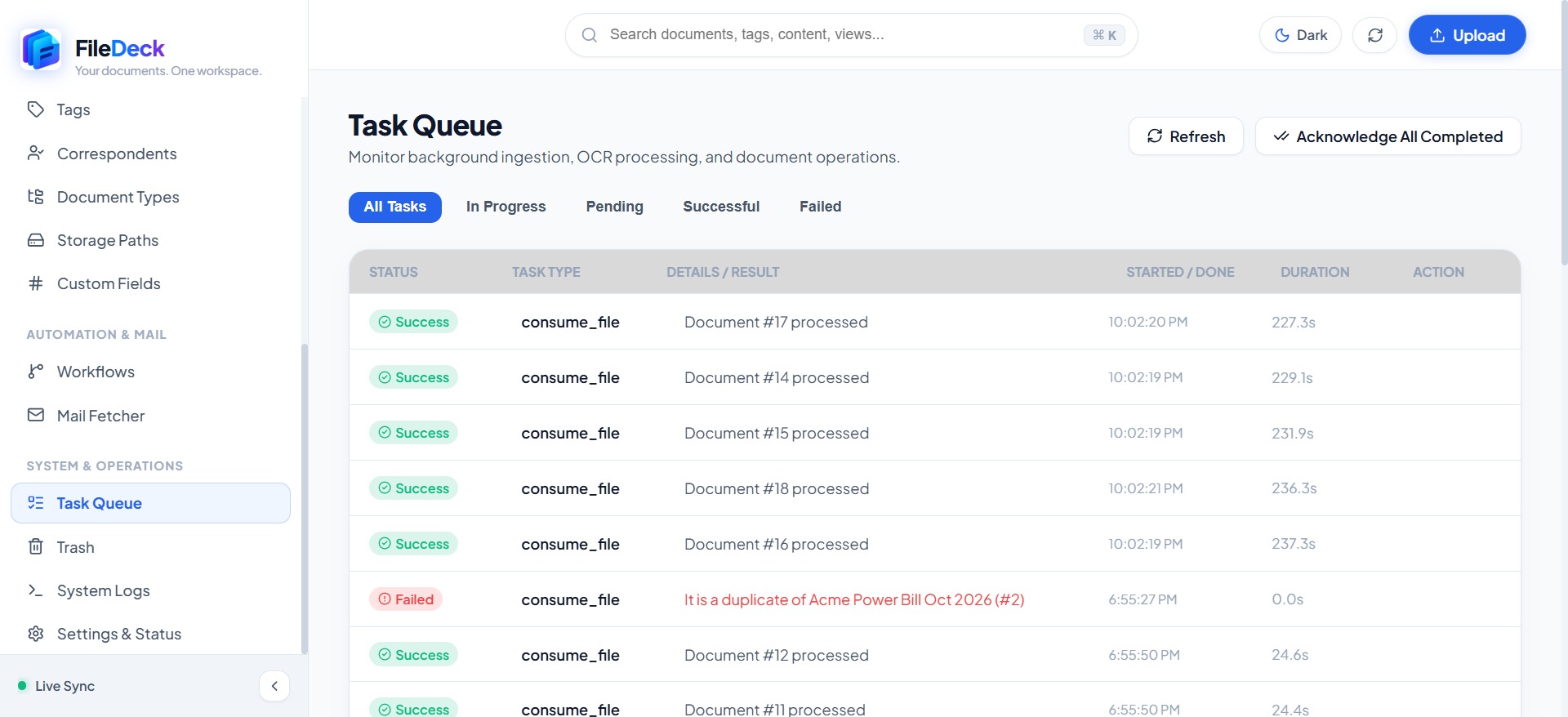
Live Operations & Task Queue
06 • Worker Pipeline

Real-time worker pipeline monitoring for RapidOCR batches, text extraction jobs, retry handling, and 30-day soft-delete trash restoration.

Async Job Queue RapidOCR Progress 30-Day Trash Net
Offline Capabilities

Technical Architecture &
Core Capabilities

Replace disjointed web converters and manual data entry with a cohesive, offline desktop workstation.

30 Native PDF Utilities

Dedicated offline engine covering structure, optimization, conversion, security, and annotation. Supports AES-256 password encryption, irreversible blackout redactions, visual diff comparison, and batch image extraction without page limits.

Merge & Split AES-256 Security Redaction Office to PDF Visual Diff

Schema-Driven IDP & Review Grid

Extract tabular fields from invoices, receipts, and forms. Features human-in-the-loop review with click-to-source bounding box inspection, regex validation rules, scanner ADF hardware integration (WIA/NAPS2), and direct export to styled Excel workbooks.

Custom Schemas Regex Validation WIA / NAPS2 ADF Excel (.xlsx) Export

On-Device Qwen 2.5 AI

Local 1.5B Instruct model running 100% on CPU via GGUF quantization. Summarize agreements, extract terms, and query paperwork with exact document citations.

Qwen 2.5 GGUF 0 Cloud Tokens Citations

Tantivy BM25 Search Engine

In-memory Rust index over OCR text, titles, correspondents, and custom notes. Delivers sub-millisecond query results across hundreds of thousands of document records.

Faceted Search Saved Views Cmd/Ctrl + K

Version History & Safety Trash

Store document revisions, audit changes, generate Archive Serial Numbers (ASN), and preserve deleted records inside an automatic 30-day soft-delete safety trash net.

Revision Tracking ASN Barcodes 30-Day Recovery
Standalone Native Builds

Download FileDeck for
Your Desktop OS

Zero subscriptions. Zero accounts. Standalone desktop releases powered by Tauri v2 with bundled backend engines.

macOS
macOS 12+ (Apple Silicon)
Release: v0.1.0 • aarch64 / DMG
  • Native Apple Silicon M1/M2/M3/M4 build
  • Metal-accelerated OCR inference
  • Clean .dmg drag-and-drop packaging
  • Spotlight-style local file queries
Linux
Ubuntu, Debian, Fedora, RHEL, Arch
Release: v0.1.0 • AppImage, Deb & Rpm
  • Universal portable .AppImage executable
  • Debian / Ubuntu native .deb installer
  • Fedora / RHEL native .rpm package
  • Zero root permissions required for AppImage
Prefer building from source or running locally?
Clone the repository and run the full stack with Rust Axum and Python FastAPI.
git clone https://github.com/samolubukun/Filedeck.git
Core Design Principle
“FileDeck combines the privacy of offline software with the speed of modern search and 30 native PDF tools — without uploading confidential documents to third-party web servers.”
Local-First Architecture
Zero cloud telemetry • 100% on-device processing
Technical Reference

Frequently Asked
Questions

Common questions regarding local processing, CPU requirements, search indexing, and offline architecture.

Need developer support or wish to contribute?

FileDeck is open source under the MIT license. Check out our GitHub issues and discussions.

Visit GitHub Repository
How does FileDeck process documents without the cloud?
FileDeck coordinates a Rust Axum backend with a local Python daemon running RapidOCR (ONNX runtime) and PyMuPDF. Text extraction, Tantivy indexing, and file conversions occur directly on your computer's CPU. No network socket opens outbound, and zero telemetry is collected.
Which AI model is used and does it require an NVIDIA GPU?
FileDeck uses the Qwen 2.5 (1.5B Instruct) model via quantized GGUF weights. It runs smoothly on standard multi-core desktop CPUs without requiring an expensive GPU or external cloud API keys.
Are there file size or document count limits?
No arbitrary software limits exist. FileDeck is constrained only by your physical hard drive space. The underlying SQLite database uses Write-Ahead Logging (WAL) for concurrent operations, and the Tantivy search index comfortably scales to hundreds of thousands of records.
How does IDP (Intelligent Document Processing) work?
You define custom extraction schemas for receipts, bank statements, or invoices with data types (currency, date, numeric, string) and regex validation rules. The system reads scanned files, maps text coordinates into a review grid, and lets you verify bounding boxes side-by-side before exporting to styled Excel (.xlsx) workbooks.
What happens if I accidentally delete a document?
FileDeck maintains an automatic 30-Day Safety Trash Bin. Soft-deleted documents remain recoverable for 30 days with one click, preserving version histories, tags, and notes before any permanent purge confirmation.
Is FileDeck open source?
Yes. FileDeck is released under the permissive MIT License. You can inspect the source code, run it completely offline in sensitive work environments, modify it, or build custom extensions without recurring subscription tiers.